Monitor Wall Design In Technical Control Rooms

Jump to a Section
TL;DR – Quick Takeaways
What a Monitor Wall Is: Monitor walls (video walls) combine multiple displays into a single visual system that supports real-time situational awareness in mission-critical control rooms.
Why Design Matters: Proper monitor wall design improves visibility, reduces operator fatigue, and ensures critical information is readable at a glance during long shifts.
Key Design Factors: Viewing distance, lighting conditions, resolution, display technology, and video processing all directly impact operator performance.
Technology Options: LCD, LED, OLED, MicroLED, and projection systems each serve different control room needs, budgets, and environments.
Best Practice: Successful monitor walls are designed alongside control room consoles and layouts—not as standalone AV elements.
Modern control rooms depend on rapid information intake, clear visual hierarchies, and uninterrupted situational awareness. Monitor walls—also referred to as video walls—play a critical role in enabling operators to view, interpret, and act on complex data streams in real time.
When designed correctly, a monitor wall becomes an extension of the operator workstation, supporting faster decision-making, reduced cognitive strain, and improved coordination across teams operating in 24/7 environments.
What Is a Monitor Wall?
A monitor wall is a large-format visual display system composed of multiple individual screens arranged in a unified grid. These displays work together as a single visual surface, allowing operators to monitor multiple data sources simultaneously.
Unlike single large displays, monitor walls offer modularity and scalability. Systems can start with a small number of displays and expand over time as operational requirements evolve. This flexibility makes monitor walls especially well-suited for environments such as:
- Security and surveillance centers
- Emergency operations centers (EOCs)
- Network operations centers (NOCs)
- Transportation and utility control rooms
- Military and government command facilities
As the volume and complexity of monitored data increase, monitor walls provide the visual real estate required to maintain clarity without overwhelming individual operator screens.
Key Considerations When Designing a Monitor Wall
Effective monitor wall design begins with understanding how the system will support operators—not just what technology is available.
Purpose and Use Case
Define what information will be displayed and how often it changes. Surveillance, analytics, live communications, and system dashboards all impose different requirements on size, resolution, and layout.
Viewing Distance
Display size and resolution must align with how far operators sit from the wall. Improper viewing distances contribute to eye strain, fatigue, and missed information during extended shifts.
Lighting Conditions
Ambient lighting impacts display brightness and contrast requirements. Dimly lit control rooms may benefit from lower brightness displays, while well-lit environments require higher-luminance solutions to maintain visibility.
Resolution and Content Density
Higher resolutions improve clarity, especially when displaying detailed data across large surfaces. However, resolution should be selected based on real operational needs rather than maximum specifications alone.
Video Processing and Control
Monitor walls require processors to manage multiple inputs, layouts, and data sources. The processor’s complexity should match the number of feeds, redundancy requirements, and future expansion plans.
Monitor Wall Display Technologies
Different control room applications call for different display technologies. Each option presents unique advantages and tradeoffs.
LCD Displays
LCD panels are widely used due to their affordability, availability, and reliable image quality. They offer flexibility in sizing and are well-suited for many standard control room applications.
LED Displays
LED technology delivers high brightness, strong contrast, and long operational lifespans. These displays are energy-efficient and perform well in environments that require high visibility over long viewing distances.
OLED Displays
OLED panels provide exceptional image quality, fast response times, and deep contrast. Their thin, lightweight construction allows for creative layouts, though higher cost and shorter lifespan may limit suitability for some 24/7 environments.
MicroLED Displays
MicroLED is an emerging technology offering superior brightness, contrast, and durability. While currently more expensive, MicroLED systems are increasingly considered for premium, large-scale command environments.
Projection Systems
Projection remains an alternative where budget constraints or room conditions permit. While scalable, projection systems require controlled lighting and typically offer lower brightness and resolution compared to direct-view displays.
Integrating Monitor Walls with Control Room Design
A monitor wall should never be designed in isolation. Its placement, height, and layout must align with:
- Operator sightlines
- Console height and monitor positioning
- Ergonomic viewing angles
- Traffic flow and room geometry
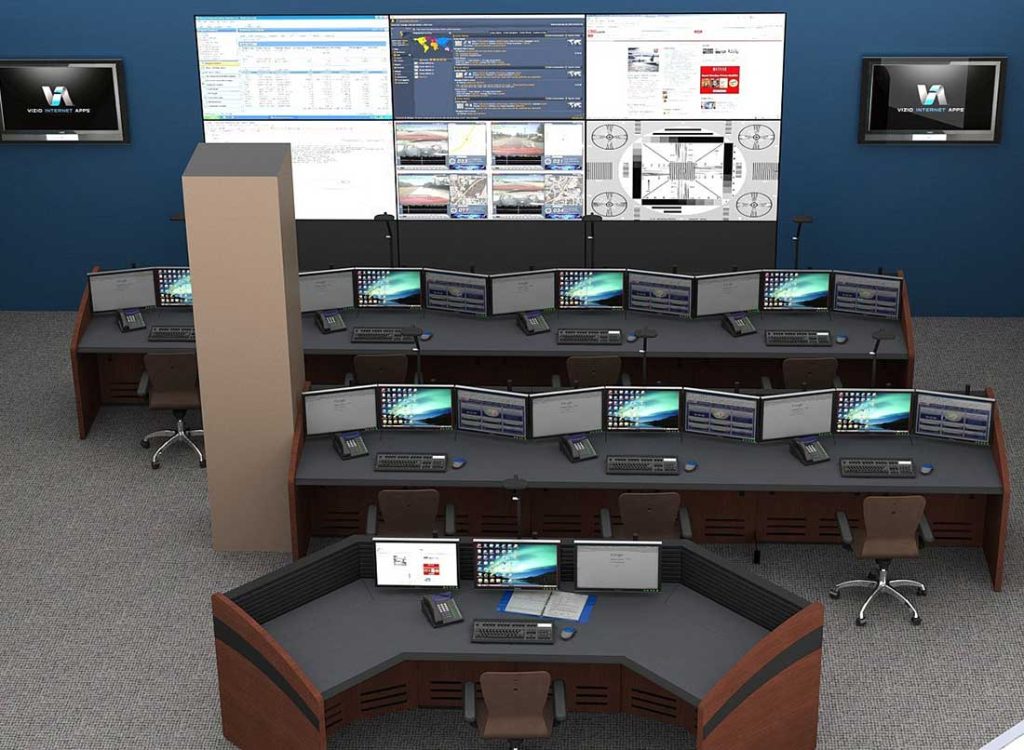
When monitor walls and console furniture are designed together, operators experience less neck strain, clearer visual hierarchies, and smoother collaboration—especially during high-pressure situations.
Monitor Walls as a Core Component of Control Room Design
Monitor walls are foundational elements of modern control rooms, supporting the real-time visibility required for mission-critical operations. Successful implementations balance technology selection with ergonomic planning, viewing conditions, and long-term scalability.
By approaching monitor wall design as part of an integrated control room strategy—rather than a standalone AV upgrade—organizations create environments that enhance operator performance, reduce fatigue, and support reliable decision-making around the clock.
Contact Command Watch
For guidance on monitor wall design, console integration, or complete control room solutions, contact Command Watch to speak with specialists experienced in mission-critical environments.
Phone: (866) 740-2121
Email: cwsales@command-watch.com
Popular Resource:
In-Depth Guide to Control Room Consoles A clear breakdown of console types, installation planning, and how to future-proof technical furniture systems.