Designing Mission Control Centers for the Future: Ergonomics and Operator Awareness
Industry > Mission Control Center (MCC)
Jump to a Section
Your comprehensive guide to building mission-critical workspaces that enhance operator performance, support 24/7 operations, and adapt to evolving technological demands.
TL;DR – Quick Summary
- What It Covers: How modern Mission Control Centers (MCCs) are designed to support continuous monitoring, fast decision-making, and long-duration operations.
- Why It Matters: Operator-focused console design improves situational awareness, reduces fatigue, and supports mission-critical performance.
- Key Takeaway: Ergonomics, display visibility, modular console systems, and long-term flexibility are essential for future-ready mission control environments.
Understanding Modern Mission Control Center Requirements
Mission Control Centers have evolved dramatically from their early origins in NASA’s Mercury program to today’s sophisticated, multi-screen environments managing everything from satellite constellations to military operations. These specialized workspaces serve as command hubs where operators monitor complex systems, coordinate team responses, and make time-sensitive decisions that can impact mission outcomes, public safety, or national security.
The fundamental challenge facing MCC designers today centers on balancing increasing technological complexity with human operator capabilities. As data streams multiply and display requirements expand, the physical workspace must support—not hinder—the cognitive demands placed on personnel. This means rethinking traditional control room design from the ground up, with operator performance as the primary metric for success.
The Critical Role of Console Furniture in Mission Success
While many organizations focus their budgets and attention on screens, servers, and software systems, the console furniture that supports them plays an equally vital role. Operators spending 10-12-hour shifts monitoring telemetry data, coordinating communications, and responding to anomalies need workstations that reduce physical strain, maintain alertness, and provide intuitive access to all necessary tools and information.
Pro Tip: When planning MCC renovations or new builds, allocate at least 25-30% of your total control room budget to console furniture and ergonomic infrastructure. This investment directly correlates with reduced operator fatigue, fewer errors during critical phases, and improved long-term retention of skilled personnel.
Poor console design creates cascading problems: operators lean forward to view displays, leading to back and neck strain; critical equipment becomes difficult to access during troubleshooting; and cable clutter creates maintenance headaches and potential safety hazards. Conversely, properly designed mission control furniture becomes nearly invisible to operators—everything they need sits within natural reach, sightlines remain clear, and the physical environment supports rather than challenges their cognitive workload.
The Growing Operational Demands Facing Mission Control Centers
Today’s MCCs must accommodate operational requirements that would have seemed impossible just a decade ago. The proliferation of sensors, satellites, unmanned systems, and real-time data sources has transformed mission control from monitoring a handful of parameters to synthesizing thousands of data points simultaneously.
High-Density Visual Information Management
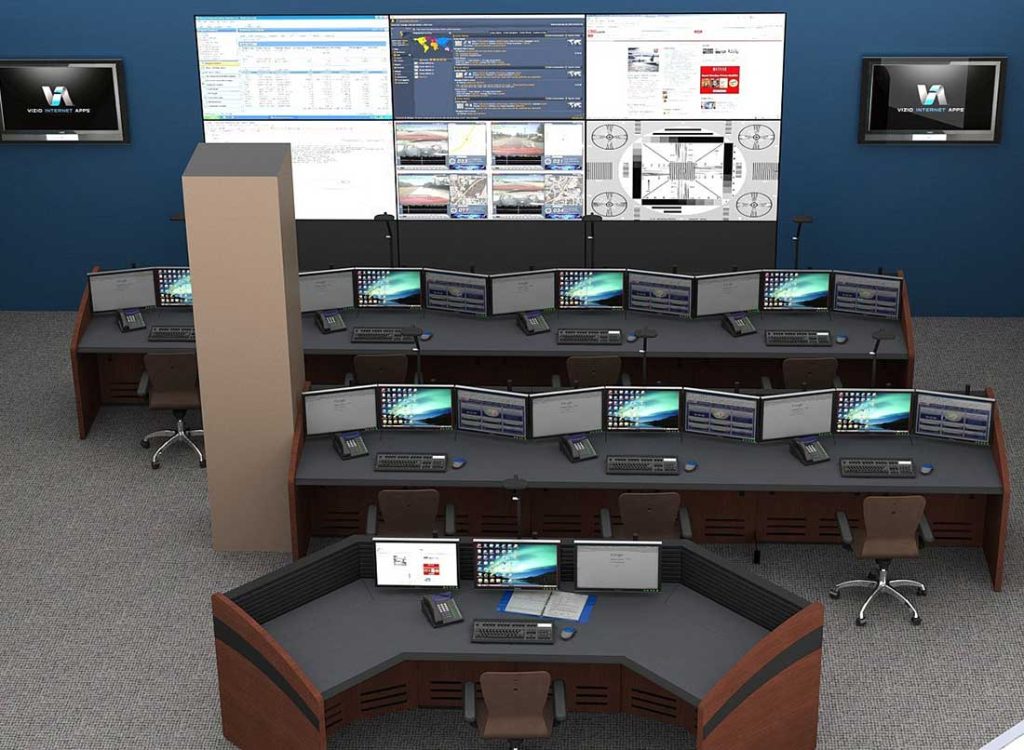
Modern operators routinely work with 4-8 monitors per workstation, plus shared video wall displays showing mission-wide status. These displays might include live telemetry feeds, geographic information systems, communications status, equipment health monitoring, and predictive analytics—all requiring constant attention and rapid interpretation.
The challenge extends beyond simply mounting enough screens. Display information must be organized logically, positioned within natural viewing angles, and sized appropriately for the viewing distance. Operators need the ability to focus on detailed data on personal monitors while maintaining peripheral awareness of video wall content showing overall mission status or emerging situations requiring team response.
Multi-Operator Collaboration Requirements
Unlike traditional office environments, where individuals primarily work on independent tasks, mission control operations demand constant collaboration. Flight directors need visibility into operator stations, specialists must coordinate responses across disciplines, and supervisors must be able to observe overall team performance while maintaining their own monitoring responsibilities.
Console layouts must facilitate this collaboration by carefully positioning components and managing sightlines. Operators need visual access to team leaders without turning away from primary displays. Supervisors benefit from slightly elevated positions or stand-capable workstations that provide an overview perspective. Communication paths between adjacent operators should remain clear for rapid verbal exchanges during time-critical events.
Expert Advice: Design console layouts with “command presence” in mind—position supervisory stations so personnel can observe operator screens without hovering directly behind them, which creates psychological pressure and reduces performance. A 45-degree offset position typically provides adequate visibility while maintaining operator autonomy.
Continuous Operations and Extended Shift Considerations
Many mission control environments operate 24/7/365, with operators rotating through 8, 10, or 12-hour shifts. This continuous operation model creates unique ergonomic challenges that traditional office furniture wasn’t designed to address. Fatigue accumulates differently during overnight shifts, lighting requirements change between day and night cycles, and operators need more extensive ergonomic adjustments to maintain comfort across extended periods.
The furniture supporting these environments must accommodate multiple operators with varying body types and preferences as workstations are handed off between shifts. Quick, intuitive adjustability becomes essential—operators shouldn’t need tools or complex procedures to configure their workspace at shift start. Preset positions, memory controls, and clearly marked adjustment mechanisms help ensure each operator quickly achieves optimal ergonomic positioning.
Ergonomic Design: The Foundation of High-Performance Mission Control
Ergonomics in mission control extends far beyond selecting comfortable chairs. Every aspect of the operator’s physical interaction with the workspace impacts their ability to maintain focus, process information accurately, and respond effectively to mission events over extended periods.
The Cognitive Cost of Poor Ergonomics
Research consistently demonstrates that physical discomfort directly degrades cognitive performance. Operators experiencing neck strain from poorly positioned monitors, back pain from inadequate lumbar support, or eye fatigue from excessive screen glare show measurably slower response times, increased error rates, and reduced situational awareness compared to operators in properly configured workstations.
In mission-critical environments where seconds matter and errors can have serious consequences, these performance decrements aren’t merely comfort issues—they represent operational risks.
An operator distracted by shoulder pain or constantly shifting position to relieve discomfort has less cognitive capacity available for monitoring complex telemetry data or coordinating team responses to anomalies.
Essential Ergonomic Features for Mission Control Consoles
The most effective control room console systems incorporate multiple ergonomic considerations into an integrated design approach:
Adjustable Monitor Positioning: Monitors should be positioned at eye level or slightly below, typically 18-30 inches from the operator’s eyes, depending on screen size. Height adjustment, tilt, and swivel capabilities allow operators to eliminate neck strain and maintain neutral head positioning. Multi-monitor arrays benefit from curved or angled configurations that maintain consistent viewing distances across all displays.
Proper Work Surface Height: Standard desk heights (29-30 inches) don’t accommodate the range of operator body types and preferences found in 24/7 operations. Adjustable-height work surfaces—either manually adjusted or electrically controlled—allow each operator to achieve proper elbow angle and wrist positioning for keyboard and mouse use.
Sit-Stand Compatibility: The ability to alternate between sitting and standing positions throughout a shift provides significant health and alertness benefits. Sit-stand-capable consoles allow operators to address circulation issues, back strain, and mental fatigue associated with prolonged sitting. Supervisors particularly benefit from stand-capable positions that provide a better visual overview of their team.
Optimized Sightlines: Console design must maintain clear sightlines to shared video walls, adjacent operator positions, and supervisory stations. Nine to twelve-inch raised rear equipment sections or slatwalls provide vertical space for monitor mounting while keeping the primary work surface unobstructed and maintaining visibility across the control room.
Task-Appropriate Seating: While not technically part of console furniture, seating selection critically impacts overall ergonomic performance. Mission control operators need 24-hour-rated chairs with adjustable lumbar support, seat depth adjustment, customizable armrests, and breathable materials that maintain comfort during extended shifts.
Pro Tip: Conduct ergonomic assessments with actual operators from different shifts and body types during the console selection process. What works perfectly for average-height personnel may create significant problems for taller or shorter operators who will use the same workstation on different shifts.
Enhancing Operator Awareness Through Strategic Console Configuration
Situational awareness—an operator’s accurate perception of relevant information, comprehension of its meaning, and projection of future status—represents the most critical cognitive skill in mission control environments. Console design either supports or undermines this awareness by shaping information visibility, accessibility, and operator attention management.
Designing for Optimal Line-of-Sight
Every element competing for an operator’s visual attention must be carefully positioned within their natural field of view. The human visual system has specific characteristics that MCC designers should accommodate:
The central 10-degree cone of vision provides the highest acuity and color perception, making it ideal for detailed telemetry data that requires precise interpretation. The surrounding 30-degree zone maintains good detail perception for secondary monitoring tasks. Peripheral vision extending to 90-120 degrees provides awareness of motion and changes, but limited detail resolution—perfect for noticing changes on video walls or adjacent operator screens that merit shifting direct attention.
Console layouts should position primary mission-critical displays within the central viewing zone, secondary monitoring information in the surrounding area, and shared resources, such as video walls, in the peripheral awareness zone. This arrangement minimizes head movement, reduces eye strain from constant refocusing, and allows operators to maintain continuous awareness of overall mission status while focusing on detailed tasks.
Multi-Monitor Array Configuration
The shift from single-monitor setups to 4-8 monitor arrays per operator creates both opportunities and challenges. More screens enable simultaneous display of more information streams, reducing the need for operators to toggle between applications or rely on memory of previously viewed data. However, poor monitor arrangement can actually degrade performance by forcing excessive head movement, creating awkward viewing angles, or positioning critical information at the edges of the array where it receives less attention.
Effective multi-monitor configurations typically employ:
Curved or angled arrangements that maintain consistent viewing distance and angle across all displays, reducing the parallax effects and viewing angle color shifts that occur with flat-line arrangements
Mixed orientations pairing landscape-oriented displays for graphical data, geographic systems, and video feeds with portrait-oriented screens for vertically-scrolling lists, communications logs, or procedure checklists
Logical grouping places related information streams adjacent to each other so operators develop spatial memory for where specific data types appear, reducing search time during high-workload periods
Consistent positioning across workstations so operators transitioning between stations on different shifts don’t need to relearn information locations
Acoustic and Lighting Optimization
The visual focus of mission control design can overshadow equally important acoustic and lighting considerations. Excessive ambient noise from HVAC systems, equipment fans, or conversations at adjacent consoles forces operators to increase audio monitor volumes, creating a feedback loop that escalates overall noise levels. Sound-absorbing panels, strategic placement of sound-generating equipment, and console designs incorporating acoustic barriers help maintain quiet environments conducive to concentration.
Lighting presents particular challenges in MCCs where operators must view both bright monitors and dimmer video walls simultaneously. Excessive ambient lighting creates screen glare and reduces contrast, while insufficient lighting causes eye strain and makes paper-based procedures difficult to read. The most effective approach involves multiple lighting zones:
- General ambient lighting is maintained at lower levels than in typical offices (300-500 lux vs. 500-750 lux)
- Task lighting at individual consoles provides adequate illumination for writing or reading without creating screen glare
- Indirect or diffused lighting that minimizes direct sources in the operator’s field of view
- Video wall lighting is designed to minimize reflection while providing sufficient ambient light for safe movement
- Dimmable controls allowing adjustment for circadian rhythm support during overnight shifts
Expert Advice: Install lighting controls at the console level rather than room-wide switches, allowing operators to customize their immediate environment. Individual operators have different lighting preferences, and the ability to adjust task lighting without affecting colleagues improves overall satisfaction and reduces conflict during high-stress operations.
Equipment Integration: Cable Management and Hardware Accessibility
Mission control operations depend on reliable access to servers, network equipment, power distribution, and specialty hardware. The console furniture supporting this equipment must balance protection and accessibility—keeping sensitive equipment secure while ensuring maintenance technicians can quickly address issues during operations.
The Critical Role of Cable Management
Poor cable management represents one of the most common failures in mission control design. Loose cables create trip hazards, interfere with equipment cooling, complicate troubleshooting, and project an unprofessional image during facility tours or high-level visits. More seriously, inadequate cable organization makes moves, adds, and changes time-consuming and error-prone, increasing operational risk during reconfigurations.
Professional control console systems incorporate multiple cable management features:
Integrated cable raceways running along console bases and through vertical support columns provide protected pathways for power, network, and signal cables between equipment and operator positions
Vertical cable managers on console backs organize the transition between horizontal raceways and elevated equipment like monitors, preventing cable sag and maintaining clean aesthetics
Grommet systems at the work surface level allow cables to pass through the console surface without sharp edges that could damage cable jackets
Equipment cavity organization using mounting strips, cable ties, and separation between power and low-voltage signal cables to prevent interference
Service loops provide extra cable length at connection points so equipment can be pulled forward for maintenance without disconnecting cables
Color coding and labeling systems make it easy to trace cables and identify correct connections during troubleshooting
Strategic Hardware Placement and Ventilation
Servers, network switches, workstation computers, and specialty equipment generate substantial heat that must be managed to prevent performance degradation and premature failure. Console designs incorporating ventilated equipment cavities, adequate clearance around heat-generating components, and strategic placement of intake and exhaust areas ensure reliable operation without excessive cooling costs.
Equipment placement should follow several key principles:
Heavy items like UPS systems or servers should be located low in the console structure to lower the center of gravity and improve stability
Heat-generating equipment benefits from placement in areas with good air circulation, avoiding confined spaces without ventilation paths
Frequently accessed components should be positioned for easy reach without requiring operators to leave their stations during critical operations
Noisy equipment should be isolated from areas directly behind operators to minimize acoustic disturbance
Pro Tip: Specify equipment cavities at least 20% larger than current equipment dimensions to accommodate future upgrades and unanticipated additions. Technology evolves quickly, and console furniture typically remains in service for 10-15 years—building in extra capacity from the start prevents expensive modifications later.
Maintenance Access and Removable Panels
When equipment fails during operations, technicians need rapid access for diagnosis and repair. Console designs incorporating removable panels, hinged doors, or slide-out equipment shelves dramatically reduce mean time to repair compared to designs requiring tools, complete console disassembly, or operator displacement for access to critical components.
The most maintenance-friendly consoles provide:
- Tool-free access panels on console fronts and backs for common maintenance tasks
- Hinged doors with soft-close mechanisms to prevent noise and protect adjacent equipment
- Slide-out shelves allow computers or servers to be pulled forward for access without disconnecting cables
- Clear labeling of panel removal procedures and safety warnings
- Protected access to power distribution, network patches, and other connection points
Modular Architecture: Building for Change and Growth
The only certainty in mission control operations is change. Missions evolve, technology advances, organizational structures shift, and operational requirements expand. Console furniture locked into fixed configurations becomes an expensive liability when modifications require complete replacement rather than reconfiguration.
The Value of Modularity in Long-Term Facility Planning
Modular console systems use standardized components that can be rearranged, expanded, or reconfigured without starting from scratch. This flexibility provides several critical advantages:
Operational flexibility: As mission requirements change, console layouts can adapt by adding operator positions, reconfiguring team groupings, or adjusting sightlines to new video wall locations—all without extended downtime or complete facility renovation.
Financial efficiency: Rather than replacing entire console systems when needs change, organizations can purchase additional modules or modify existing configurations, spreading capital expenses over time and avoiding the waste of disposing of functional furniture.
Technology integration: Modular designs accommodate new equipment types and sizes without requiring custom fabrication or awkward workarounds. As monitors grow larger, as new device types emerge, or as cable standards change, modular systems can adapt through component updates rather than wholesale replacement.
Reduced implementation risk: Modular systems allow phased implementation, starting with critical operator positions and expanding gradually as budget allows and operational experience refines requirements. This approach reduces the risk of large-scale design mistakes and allows course corrections before full deployment.
Configuration Flexibility: Supporting Multiple Layout Options
The most versatile modular console systems support multiple configuration types:
Linear arrangements align multiple operator positions in straight rows, maximizing space efficiency and providing clear sightlines to front-wall video displays
Curved layouts arrange operators in gentle arcs that improve team communication and provide supervisors with a better visual overview of operator screens
Corner configurations utilize wall intersections efficiently and create natural groupings for specialized teams
Cluster arrangements group multiple operators around central supervisory positions, supporting close collaboration during complex operations
Peninsula or pod layouts create semi-isolated teams within larger control rooms, providing acoustic separation while maintaining overall facility integration
The ability to transition between these layouts—or combine multiple layout types within a single facility—allows mission control centers to adapt to changing team structures, mission profiles, or operational philosophies without abandoning existing console investments.
Expert Advice: When evaluating modular console systems, test the actual reconfiguration process. Some manufacturers claim modularity while requiring extensive disassembly, special tools, or expert technicians to make changes. True modularity allows facility staff to perform common reconfigurations with minimal tools and reasonable effort.
Sit-Stand Functionality: Supporting Operator Wellness and Performance
The health and performance benefits of sit-stand workstations have moved from research findings to operational reality across many industries. In mission control environments where operators spend extended periods at their stations, the ability to alternate between sitting and standing positions provides measurable improvements in alertness, circulation, and long-term health outcomes.
The Physiological Benefits of Position Variation
Prolonged sitting creates multiple physiological stresses. Blood pools in the lower extremities, reducing the efficiency of circulation. Back muscles fatigue from maintaining a seated posture. Metabolic rate decreases, affecting energy levels and cognitive alertness. Hip flexors and hamstrings shorten over time, creating postural problems that persist even outside work hours.
Standing provides natural relief from these issues. Leg muscles engage to support body weight, improving circulation. Core muscles activate to maintain balance and posture. Metabolic rate increases moderately, supporting alertness. The simple act of transitioning between positions provides movement and muscle activation, breaking up the physical stagnation of extended sitting.
For mission control operators working 10-12-hour shifts, the ability to stand periodically throughout the shift—even for just 15-20 minutes per hour—significantly reduces discomfort and fatigue accumulation that degrade performance later in the shift.
Implementation Considerations for Sit-Stand Consoles
Successfully integrating sit-stand capability into mission control environments requires careful attention to operational workflow:
Transition speed: Electric sit-stand systems should complete the full range of motion in 20-30 seconds maximum. Longer transitions discourage regular use, as operators become frustrated waiting for position changes during busy operational periods.
Stability during motion: Console monitors, equipment, and personal items should remain stable during height adjustment. Excessive vibration or movement creates concern about equipment damage and reduces operator confidence in the system.
Noise level: Height adjustment should operate quietly enough to avoid disturbing adjacent operators during shift changes or position adjustments. This consideration becomes particularly important during overnight operations when overall ambient noise levels drop.
Memory positions: The ability to save preferred heights for multiple operators—and recall them with a single button press—dramatically improves adoption. Operators shouldn’t need to fine-tune their position manually at each shift start.
Safety features: Anti-collision sensors, soft-start mechanisms, and clearly marked moving parts protect both operators and equipment during height transitions.
Supervisory considerations: Stand-capable consoles provide particular value for supervisory positions, where the elevated perspective improves visual overview of operator stations and allows supervisors to observe multiple screens simultaneously.
Technology Integration and Future-Proofing Strategies
Mission control centers represent significant capital investments typically expected to remain functional for 10-15 years or longer. During this timeframe, display technology, network standards, power requirements, and operational tools will evolve substantially. Console design must anticipate and accommodate this evolution without requiring complete replacement.
Anticipating Display Evolution
Monitor technology continues to advance rapidly. Resolution increases from 1080p to 4K, then to 8K, and beyond. Screen sizes grow as manufacturing costs decline. New form factors, such as ultra-wide displays and flexible screens, emerge. Mounting standards and weight requirements shift.
Future-ready console furniture accommodates this evolution through:
Robust mounting infrastructure capable of supporting heavier or larger displays than currently deployed, with VESA mounting patterns compatible with multiple generations of monitors
Flexible positioning systems using articulating arms or adjustable slatwalls rather than fixed monitor shelves, allowing adaptation to different screen sizes and viewing requirements
Adequate power and data capacity in cable raceways and at operator positions to support additional screens or higher-power requirements from future display technologies
Modular slatwall systems provide adjustable mounting points rather than fixed holes drilled at specific heights, allowing complete reconfiguration as monitor sizes and arrangement strategies evolve
Infrastructure Capacity Planning
Beyond displays, consoles must accommodate growth in computing power, network bandwidth, and specialty equipment:
Power distribution: Plan for 50-100% power capacity above current requirements at each operator position. Modern equipment may appear more power-efficient per device, but operators tend to add more devices over time, leading to overall power consumption increases.
Network connectivity: Specify additional network drops and fiber connections beyond immediate needs. Upgrading embedded cable infrastructure after console installation is expensive and disruptive.
Equipment space: Reserve extra equipment cavity volume for unanticipated additions. The specialty devices and custom tools that emerge during operations often weren’t considered during initial design.
Cooling capacity: As equipment density increases, ventilation requirements grow. Consoles with adjustable ventilation pathways or fan mounting provisions can adapt to changing thermal management needs.
Pro Tip: Create a 10-year technology roadmap during initial design, projecting equipment evolution based on industry trends and organizational strategic plans. Design console infrastructure to accommodate year 7-10 requirements, not just current needs. This approach typically adds only 10-15% to initial costs while preventing expensive retrofits.
Selecting the Right Console Furniture for Your Mission Control Center
With a clear understanding of operational requirements, ergonomic principles, and integration challenges, facility planners can approach console selection systematically. The right choice balances current operational needs with future flexibility, robust construction with aesthetic considerations, and comprehensive capability with budget constraints.
Essential Features for Mission-Critical Environments
Regardless of specific mission profiles or organizational preferences, certain console capabilities prove essential across all professional mission control applications:
Heavy-duty construction: Steel frames and reinforced structures capable of supporting 200-400+ pounds of equipment per operator position, with safety factors appropriate for 24/7 operations
Integrated cooling: Ventilated equipment cavities, perforated panels, or active cooling provisions preventing heat buildup that degrades equipment reliability
Professional cable management: Comprehensive raceway systems, vertical managers, and access points that maintain organized cable routing throughout the console life cycle
Ergonomic work surfaces: Properly sized and positioned worktops providing adequate space for keyboards, mice, documentation, and personal items without cramping or forcing equipment to clutter the console
Flexible equipment mounting: Slatwall systems, VESA mounting provisions, or equipment shelving accommodating diverse mounting requirements across different equipment types
Durability and maintenance: High-pressure laminate surfaces, powder-coated steel finishes, and commercial-grade components designed for continuous use in demanding environments
Aesthetic customization: Color and finish options allowing console furniture to match facility standards, corporate identity, or specific design themes
Understanding Product Lines and Application Fit
Console manufacturers typically offer multiple product lines targeting different application priorities and budget levels. Understanding these distinctions helps match organizational needs with appropriate solutions.
Premium enclosed consoles provide the highest level of finish quality, equipment protection, and acoustic isolation. These systems feature full enclosures, premium materials, and extensive customization options. They work best in high-visibility facilities hosting frequent tours, in controlled environments where equipment protection is critical, or in applications where acoustic isolation between operator positions matters significantly.
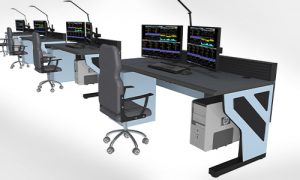
Open-frame consoles prioritize ergonomics, equipment access, and cost efficiency over full enclosure. These systems provide excellent functionality at lower price points, with easier equipment access and better ventilation than fully enclosed designs. They suit budget-conscious projects, facilities with separate equipment rooms, or installations where rapid equipment changes are common.
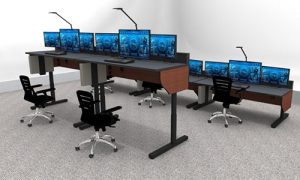
Sit-stand consoles add electric height adjustment to either enclosed or open-frame base designs. This capability matters most in extended-shift operations, in facilities prioritizing operator wellness, or in positions that require frequent transitions between sitting and standing tasks, such as supervisory or coordination roles.
Evaluating Manufacturers and Making Final Selection
Console furniture represents a significant investment requiring careful vendor evaluation:
Industry experience: Prioritize manufacturers with documented experience in mission-critical control room environments rather than general office furniture suppliers, adapting standard products
Engineering support: Access to application engineers who can assist with layout optimization, equipment integration, and technical problem-solving during design and implementation
Reference installations: Visit actual installations similar to your requirements, speaking with operators and facility managers about real-world performance and manufacturer support
Warranty and support: Understand warranty coverage, parts availability, technical support responsiveness, and long-term component availability for future modifications
Delivery and installation: Clarify lead times, installation procedures, commissioning support, and operator training provisions
Total cost of ownership: Consider not just initial purchase price but installation costs, maintenance requirements, modification expenses, and expected service life
Trends Shaping Next-Generation Mission Control Design
As mission control technology and operational methodologies continue evolving, several key trends are reshaping how organizations approach facility design:
Distributed operations: Some mission control functions are shifting from centralized facilities to distributed teams, with console furniture supporting both co-located and remote operator configurations through integrated communications technology and consistent ergonomic standards across locations.
AI and automation integration: As artificial intelligence assumes routine monitoring tasks, operator roles shift toward exception handling and strategic decision-making. Console designs are adapting to support this evolution, with larger display areas for presenting synthesized information and better collaboration spaces for team problem-solving.
Operator experience focus: Organizations increasingly recognize that operator satisfaction, wellness, and professional development directly impact mission success. This recognition drives investment in premium ergonomic features, environmental quality, and workspace aesthetics that acknowledge operator expertise and support career longevity.
Rapid reconfiguration capability: The pace of mission changes continues accelerating, with some organizations needing to reconfigure control room layouts monthly or quarterly rather than annually. This need drives demand for more modular systems and tool-free reconfiguration capabilities.
Sustainability considerations: Energy efficiency, recyclable materials, and long service life factor into console selection as organizations balance operational requirements with environmental responsibility and corporate sustainability commitments.
Implementing Your Mission Control Center: From Design to Operations
Successful MCC implementation requires careful project planning extending beyond console furniture selection:
Layout Development and Operator Involvement
Involve actual operators early in the design process. Personnel who will use the facility daily provide invaluable insights into workflow patterns, information relationships, and practical considerations that designers might miss. Conduct workshops with operators from different shifts, experience levels, and specialties to gather diverse perspectives.
Create full-scale mockups of critical operator positions using temporary materials or reconfigurable furniture. Have operators work in these mockups for several days, providing feedback on sightlines, reach distances, equipment access, and collaboration patterns. This investment in pre-construction validation prevents expensive post-installation modifications.
Phased Implementation Strategies
Large mission control centers benefit from phased implementation approaches:
Phase 1: Deploy a single prototype console cluster containing all planned features and configurations. Operate this cluster for several weeks, gathering detailed operator feedback and identifying necessary adjustments.
Phase 2: Implement modifications based on Phase 1 learning, then deploy console furniture for all operator positions while maintaining temporary equipment for testing and validation.
Phase 3: Complete final equipment installation, cable dressing, and environmental systems integration, then conduct comprehensive operational testing before formal facility commissioning.
This phased approach costs slightly more and extends project timelines, but dramatically reduces the risk of facility-wide design problems and operator dissatisfaction.
Training and Transition Management
Don’t underestimate the change management challenge of transitioning to new facilities. Even improved ergonomics and better equipment represent change, and operators need time to adapt. Provide:
- Hands-on training for console adjustment features and equipment access procedures
- Written guides with photos showing proper console configuration
- Gradual transition periods where operators can familiarize themselves with new layouts during non-critical operations
- Regular feedback sessions during the first 90 days to identify and address issues quickly
- Ergonomic assessments for operators experiencing discomfort, ensuring proper console configuration
Frequently Asked Questions About Mission Control Center Design
What is the ideal console footprint for a mission control operator position?
Professional mission control consoles typically require 8-12 linear feet per operator position, with a depth of 4-6 feet. This footprint accommodates multi-monitor arrays, adequate work surface area, equipment cavities, and cable management infrastructure. Positions requiring specialized equipment or additional displays may need 14-16 feet. Minimum recommended spacing between operator rows is 8-10 feet to allow equipment access and technician movement during operations.
How do I determine the right number of monitors per operator position?
Monitor requirements depend on information density and task complexity. Basic monitoring positions may function adequately with 3-4 displays, while specialized analysts or coordinators might need 6-8 monitors. Rather than specifying fixed numbers, identify all information streams operators need to be simultaneously visible, then map these to display real estate considering resolution, readability, and viewing angles. Plan console infrastructure for 2-3 more monitors than current requirements to accommodate growth.
Should we invest in sit-stand consoles for all operator positions, or only for select roles?
While sit-stand capability benefits all operators, budget constraints often require prioritization. Highest-value applications include supervisory positions requiring frequent standing for team oversight, positions with 12+ hour shifts, operators with documented ergonomic issues from extended sitting, and rotating positions used by multiple personnel. If forced to choose, implement sit-stand for supervisors first, then expand to operator positions as budget allows.
What’s the expected service life of quality mission control console furniture?
Well-constructed console furniture from reputable manufacturers typically provides 12-18 years of continuous service in 24/7 operations. Steel construction, high-pressure laminate surfaces, and commercial-grade components withstand intensive use that would quickly degrade residential or standard office furniture. Plan for minor refurbishment around years 8-10 (replacing worn surfaces and upgrading mounting hardware), but expect the core structure to remain functional throughout this period.
How do modular consoles compare to custom-fabricated solutions in terms of cost and capability?
Quality modular systems typically cost 15-25% less than custom-fabricated consoles for initial installation, with much greater savings (40-60%) during reconfigurations or expansions. Custom fabrication provides maximum design freedom and potentially better integration with unique architectural features, but locks in configurations and makes changes expensive. Most organizations find that modular systems provide sufficient customization capability through component selection and layout flexibility while maintaining practical advantages for long-term facility evolution.
What acoustic performance should we expect from mission control console furniture?
While consoles aren’t primary acoustic control elements, design choices impact overall noise levels. Enclosed consoles with sound-absorbing panel materials typically reduce operator-to-operator noise transmission by 3-5 dB compared to open-frame designs, thereby improving acoustic comfort in large facilities. Equipment ventilation noise requires careful management—specify low-noise cooling fans (under 30 dB at operator ear height) and position ventilation exhaust away from operator positions when possible.
How important is color and finish customization for mission control facilities?
Beyond aesthetics, color selection affects operator alertness and the impression of the facility during VIP tours. Darker colors and matte finishes reduce light reflection that can cause screen glare, while lighter colors improve ambient brightness and create a more spacious feeling. Many organizations select colors that match their corporate identity or military traditions. However, avoid high-gloss finishes in any area within operator sightlines, as they create reflection problems. Work surface colors should provide moderate contrast with typical paper and keyboard colors—medium gray tones work well for most applications.
What maintenance requirements do mission control consoles have?
Quality consoles require minimal maintenance beyond regular cleaning and occasional tightening of hardware. Annually inspect cable management areas for loose connections, verify monitor mounting hardware remains secure, clean ventilation openings to prevent dust buildup, and lubricate sit-stand mechanisms if applicable. Budget 2-4 hours per console annually for preventive maintenance. Keep spare mounting hardware, grommets, and panel fasteners on hand for quick repairs. Most organizations assign console maintenance to in-house facilities staff rather than requiring vendor service contracts.
How do we balance operator preferences when multiple personnel use the same console across different shifts?
This common challenge requires a combination approach. Provide extensive adjustability so each operator can quickly configure their workspace at shift start—electric sit-stand systems with memory presets, tool-free monitor positioning, and accessible equipment controls. Create written or photographic guides showing each operator’s preferred configuration to accelerate setup. For shared equipment like keyboards or mice, provide personal storage so operators can quickly swap their preferred peripherals. Consider assigning specific consoles to specific operators when scheduling permits, reducing the frequency of reconfiguration.
What technology trends should inform console infrastructure planning today?
Several emerging trends warrant infrastructure consideration: increasing display resolution driving higher bandwidth network requirements (plan for 10GbE or fiber at operator positions); growing use of GPU-accelerated computing requiring additional power distribution and cooling; integration of immersive display technologies like VR/AR headsets needing mounting provisions and cable access; potential deployment of collaborative robots or automated systems requiring console-adjacent space; and increasing use of wireless technologies for peripherals and collaboration tools, requiring RF-friendly materials and adequate power for charging stations.
Conclusion: Investing in Operator-Centric Mission Control Design
The future of mission control operations depends not just on advanced technology but on creating human-centered workspaces that allow operators to perform at their highest level throughout extended operations. Console furniture represents the physical interface between operators and mission systems—when designed thoughtfully, it becomes nearly invisible, allowing personnel to focus entirely on mission objectives rather than fighting their work environment.
Organizations building or renovating mission control centers should resist the temptation to view console furniture as a commodity purchase where the lowest cost wins. The differential between basic commercial furniture and professional mission control consoles represents a tiny fraction of total facility costs and operational budgets, yet it directly impacts operator performance, satisfaction, and retention—factors that drive mission success over decades of operations.
Begin your facility planning by understanding operator workflows, information relationships, and ergonomic requirements. Involve personnel at all levels in the design validation process. Select console furniture from manufacturers with proven mission-critical experience. Build in flexibility for future change. Prioritize operator wellness through sit-stand capability and comprehensive ergonomic features. Plan infrastructure capacity beyond current needs to accommodate technology evolution.
By following these principles and investing appropriately in professional console furniture designed specifically for mission control applications, organizations create facilities that support operator excellence, adapt to evolving missions, and deliver an exceptional return on investment throughout their operational lifespans.
The missions you support—whether aerospace, defense, emergency response, or infrastructure management—depend on operators maintaining peak cognitive performance during critical events. Give them the workspace they deserve.
View our full service page 🔗 Mission Control Center (MCC)